
Return
to Digital Literacy Web Agenda
January 27, 2025
What is the SAMR model?
Created by John Spencer |
- Log in and go to While You Are Waiting for attendance and other activities.
- Moving on to some technology models:
These models help inform our work as teachers to be CRITICAL THINKERS and INFORMED DECISION MAKERS. It is professional knowledge that will help you as a teacher.
- SAMR: Another way to think about how teachers and students use technology.
Let's review from the video what SAMR stands for
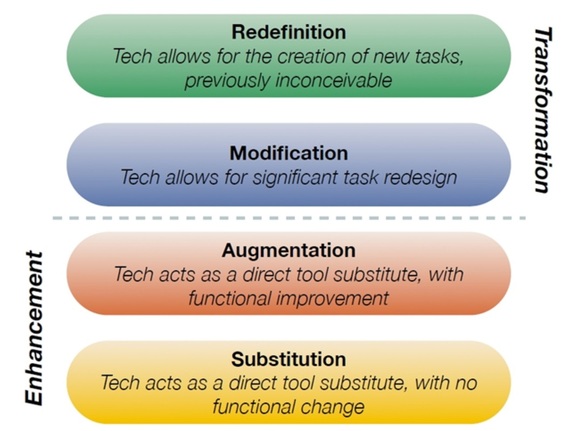
Image the creation of Dr. Ruben Puentedura, Ph.D. http://www.hippasus.com/
Substitution
does not modify the task beyond using a technology substitutionAugmentation
the task is mostly the sam with technology adding some improvementModification
technology redesigns the task with a similar outcome but the product has been enhanced and/or changedRedefinition technology allows for the creation of new tasks not possible without technology. - Substituting traditional textbooks with e-books
- Using Canvas or other LMS Quiz features instead of paper quizzes
- Having students use MS word to turn in typed papers instead of written papers
- Using the discussion board instead of the traditional face-to-face class discussion
- Creating a video lesson in place of in-person lesson/lecture
- Turning in assignments using email or your learning management system (Canvas)
- Using hyperlinks in emails or documents
- Using Text to speech to read or write (word, Google Docs, Canvas, etc.)
- Using a survey tool to ask questions and gather information
- Speech or text feedback in Canvas rubrics
- Interactive whiteboard tools
- Presentations with some multimedia elements (PPT, Google Slides, etc.
- Bookmarking tools (Pinterest, Diigo, etc.) to curate and compile information
- Collaboration tools that allow for shared construction and knowledge in real time
- Create webpages with links, videos, and images
- Infographics
- Timeline tools that use text, video, audio, links, etc.
- 3-D design and printing
- Coding robotics
- Zoom meetings with geographically scattered participants
- Virtual field trips
- Augmented reality, simulation, VR
- AI multimedia creations (images, video)
Source: https://pressbooks.nebraska.edu/onlineteaching/chapter/samr-model-for-integrating-technology/
Even more examples: https://classful.com/samr-model-examples/
- TPACK: What is it and why might it be useful in understanding how teachers integrate technology in their practice? The key is that the K in TPACK is what ya' know or in other words the teacher's KNOWLEDGE.
TPACK OVERVIEW (Google Slides)
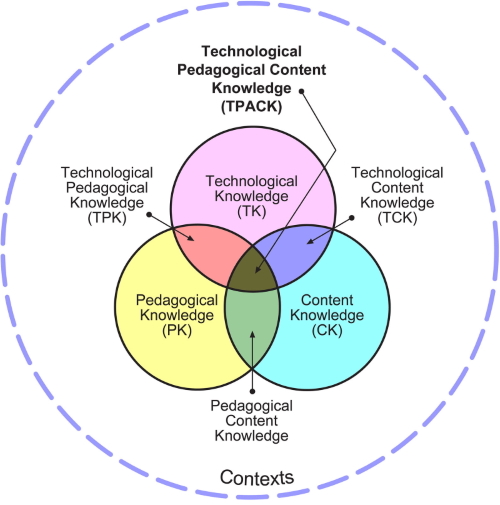
Alan Parkinson from flikr CC-by-nc-2.0
REVIEW WITH FLIPPITY (NYT CONNECTIONS):https://tinyurl.com/4axsnp4c
- SAMR: Another way to think about how teachers and students use technology.
- Web 2.0 tools are web-based and let you create something (video, image, blog post, snapchat photo, website, slidedeck, document, online timeline or graph) by accessing the tool directly from the internet. Google is a key source of web 2.0 tools including docs, sheets, forms, etc. Google Sites is also a web 2.0 tool and you're using it because you can use the tool to make a website with your own ideas and content and share with the world.
- Cloud-based access via the internet
- Can require sign up or not
- User created content
- Allows for sharing via a link (in the cloud) or a download
- Let's take a look at some curricular standards with a couple of these tools in mind:
- REVISITING Flippity https://www.flippity.net/ Let's get hands-on with a basic matching game using images. Follow my lead or go on your own....
- Go to Flippity https://www.flippity.net/ and choose the Matching Game - Instructions.
- Go down to Option 2: Google Sheets
- Copy the spreadsheet and it will open on your Chromebook (it's saved in your Google Drive by default)
- Delete the existing data in both columns (but NOT the BLUE header) and add your own content.
- We are going to do both text and images. You can use a variety of image sites but I've tested Pixabay and it works with Flippity.
- Search for your image and click to go to the image options
- Right click on the image and choose "Copy image address"
- If you use a different image site, when you have found an image you wish to use, right click to "Open image in new tab" Copy the link with the .jpg or .png at the end. If there is more text/numbers after the .jpg or .png, don't copy it - ignore it.
- Paste the address in the appropriate cell next to your word for the image.
- Do three to four matching pairs.
WANT A CHALLENGE?
Add some more matches using image searches from other sources. MAKE SURE THE IMAGE LINK ENDS WITH .JPG OR .PNG
- Once you are done, explore some of these activities created by past interns.
Matching Game with Images https://www.flippity.net/mg.php?k=1GpCe3cMvS6PnoJ2oqdajLuKAp9oHujX04WiC0rXvRjw Government (Quiz Show) https://www.flippity.net/qs.php?k=1JiRrC_8dwIGp3Fl101HagyiswbgIOArcLvy5bGfBcw4 Historical Timeline I https://www.flippity.net/tl.php?k=1wREsnOowP7Dg_Y7Rb1u9JEOIaylcxaRK5oLwtBqDsBY Historical Timeline II https://www.flippity.net/tl.php?k=11UrdKUlL5Xwq_5VXLyGFcwzSXp7b1oG5ChAOz9nij0g
- Now let's look at the assignment in Canvas - ask questions, please!
Here is a strong example:
NC SCoS Math: Measurement . Data Look at the range of grades and subject areas that have a standard related to data displays. How might your subject area and grade level use this tool? Create a Graph: Data displays We'll use your favorite breakfast votes from today's attendance question. |
Essential Skills - Social Studies
Timetoast |
||||||||||||
WANT TO KNOW MORE ABOUT THE MODELS ?
View two videos to give you an overview of SAMR and TPACK.
SAMR: https://www.youtube.com/watch?v=SC5ARwUkVQg
TPACK: https://www.youtube.com/watch?v=yMQiHJsePOM