
Return
to Digital Literacy Web Agenda
January 22, 2025
What is the SAMR model?
Created by John Spencer |
- Log in and go to While You Are Waiting for attendance and other activities.
- Let's Customize our Chromebooks a little more:
- Let's Customize our Chromebooks a little more:
- Next, let's set a shortcut for the Chromebook files area
- Press the search key (looks like a magnifying glass) on the left of the keyboard
- Search on the keyword "File"
- Look for the blue circle with a folder in it icon
- Position your mouse on the icon and right click to get the menu items
- Choose, "Pin to Shelf"
- It should appear at the bottom of your screen
- Click to see your files and BTW, also access to your Google Drive
- Next, let's set a shortcut for the Chromebook files area
- Go to Pixabay https://pixabay.com/photos/ and search for a copyright free image to us as your desktop wallpaper
- Search for your image (NOTE: Don't use those at the top since they are not free but "sponsored" and cost $)
- Click the image and choose the green "Free Download" button and then the smaller green "Download" button just above it
- If you get the "I'm not a robot" option, complete it to proceed.
- Give it a bit to download to your Chromebook files area
- Go to your Chrombook desktop and get the menu for "Set wallpaper"
- Scroll to the bottom to find "My Images" and choose your image. It should appear once you set it.
- Let's Customize our Chromebooks a little more:
- Tech Standards sharing:
https://drive.google.com/drive/folders/176Ztf6NWBryBYcw3121UeTzkrLHR4b-5?usp=sharing
- NC Tech Standards for Teachers (ISTE)
https://iste.org/standards/educators
- NC Tech Standards for Students (ISTE)
https://iste.org/standards/students
- NC Tech Standards for Teachers (ISTE)
- Another tool that offers games and utilities: Flippity https://www.flippity.net/ (one of my favorites)
- Not snazzy or slick but current and useful
(Steve Fortna, one Tech Integration Specialist/Teacher in MA and not a company and it's free)
- Uses Google Sheets as a means to create games and activities
- Quiz Show (Images) :
https://www.flippity.net/qs.php?k=1ljJyvZP1dVfc8IDinHwXhfV3Fr4aPm2xu1eZdbVtuak
- Mad Libs: https://www.flippity.net/ml.php?k=1C7rcu1vZLX2udjuXzRDYdUi7TdniHhgdoTHRIErc-Vo
- Writing Randomizer:
https://www.flippity.net/ra.php?k=1h9jWYkjWs-VJX8B7pEkioxaGcR4U_8WmBYahfW95xdA
- Matching Game (with images):
K: https://www.flippity.net/mg.php?k=1E7moa94Par2oKbHr5hsEfERlWoNSK4zbkxCFaGykR8k - UpperElem/MG Math:
https://www.flippity.net/mg.php?k=1bvev2L7lNIFkOhO0PLTzO_SQmf0c7hKPTJKbTv794no
- Manipulatives Activity: Feelings
Game: https://www.flippity.net/ma.php?k=11J7PAXRg8bUmsGj0M8x3qZ2qeV2NE8SEySwUr21U6T0
G-Sheet (with custom words, etc.): https://docs.google.com/spreadsheets/d/11J7PAXRg8bUmsGj0M8x3qZ2qeV2NE8SEySwUr21U6T0/
- THERE IS ALSO A TIMELINE OPTION IN FLIPPITY. https://tinyurl.com/bdhdscjv
- Quiz Show (Images) :
- AND, there is also a random name generator like Wheel of Names. Find it in the listing and try it out with your student's names. You can use the E-Z List option or the Spreadsheet. See https://www.flippity.net/v2/RandomNamePicker.htm
- Not snazzy or slick but current and useful
- Moving on to some technology models:
These models help inform our work as teachers to be CRITICAL THINKERS and INFORMED DECISION MAKERS. It is professional knowledge that will help you as a teacher.
SAMR: Another way to think about how teachers and students use technology.
Let's review from the video what SAMR stands for
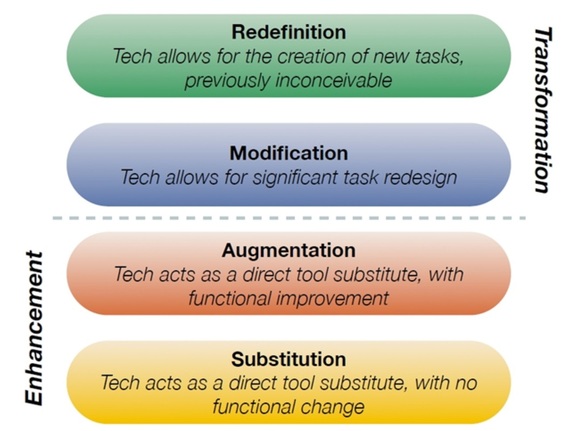
Image the creation of Dr. Ruben Puentedura, Ph.D. http://www.hippasus.com/
Substitution
does not modify the task beyond using a technology substitutionAugmentation
the task is mostly the sam with technology adding some improvementModification
technology redesigns the task with a similar outcome but the product has been enhanced and/or changedRedefinition technology allows for the creation of new tasks not possible without technology. - Substituting traditional textbooks with e-books
- Using Canvas or other LMS Quiz features instead of paper quizzes
- Having students use MS word to turn in typed papers instead of written papers
- Using the discussion board instead of the traditional face-to-face class discussion
- Creating a video lesson in place of in-person lesson/lecture
- Turning in assignments using email or your learning management system (Canvas)
- Using hyperlinks in emails or documents
- Using Text to speech to read or write (word, Google Docs, Canvas, etc.)
- Using a survey tool to ask questions and gather information
- Speech or text feedback in Canvas rubrics
- Interactive whiteboard tools
- Presentations with some multimedia elements (PPT, Google Slides, etc.
- Bookmarking tools (Pinterest, Diigo, etc.) to curate and compile information
- Collaboration tools that allow for shared construction and knowledge in real time
- Create webpages with links, videos, and images
- Infographics
- Timeline tools that use text, video, audio, links, etc.
- 3-D design and printing
- Coding robotics
- Zoom meetings with geographically scattered participants
- Virtual field trips
- Augmented reality, simulation, VR
- AI multimedia creations (images, video)
Source: https://pressbooks.nebraska.edu/onlineteaching/chapter/samr-model-for-integrating-technology/
Even more examples: https://classful.com/samr-model-examples/
TPACK: What is it and why might it be useful in understanding how teachers integrate technology in their practice? The key is that the K in TPACK is what ya' know or in other words the teacher's KNOWLEDGE.
TPACK OVERVIEW (Google Slides)
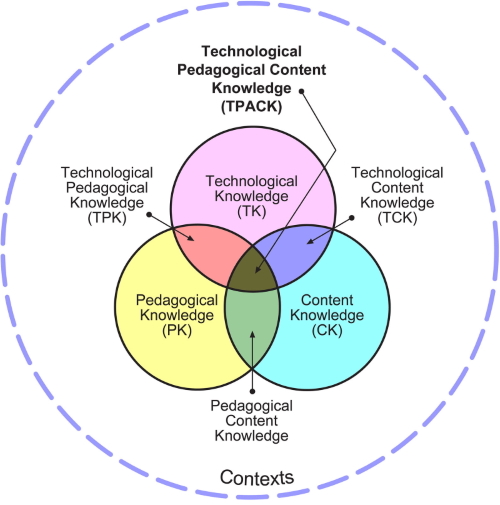
Alan Parkinson from flikr CC-by-nc-2.0
REVIEW WITH FLIPPITY (NYT CONNECTIONS):https://tinyurl.com/4axsnp4c
STUDIO TIME:Website
- Explore the options for changing the image on the homepage
- Add pages to your site called Web 2.0 #1, Web 2.0 #2, Web 2.0 #3, Web 2.0 #4, and Web 2.0 #5
- Include the following on your HOMEPAGE for 1.5 points of credit
- Text box #1: A 2-3 sentence bio paragraph introducing yourself. Make it interesting!
- Text box #2: A paragraph about your favorite professional technology (2-3 sentences) and your favorite personal technology (2-3 sentences). IF POSSIBLE, INCLUDE THE LINK TO BOTH.
- Change the background and/or banner image
- CHOOSE ONE TO ADD:
- An image on the page
- A map under your bio text box showing where you live or another relevant location
- A youtube video that's relevant with a one sentence caption
- ADVANCED: A carousel of images
- Text box #1: A 2-3 sentence bio paragraph introducing yourself. Make it interesting!
- SUBMIT THE LINK TO YOUR **PUBLISHED** WEBSITE IN CANVAS UNDER ASSIGNMENTS >> WEBSITE HOMEPAGE TO SHOW YOUR ASSIGNMENT IS COMPLETE AND READY FOR SCORING
WANT A CHALLENGE? Try out these options
- Scroll down the options in the Insert menu and add an image carousel
- Go to the Themes menu and create your own theme with custom colors and fonts you choose
- When creating your pages from the Pages menu, use the submenus option to create dropdown menus
START THINKING.....
For your first Web 2.0 tool example and profile, you'll create an instructional activity you can (but don't have to) use with your students using Padlet, Kahoot, or edPuzzle. Ask your CE what might be applicable in your classroom or the students you are working with as this should be an authentic and an efficient use of your time (e.g., double dippin' - assignment for this class and a lesson in your internship).
Here's our example assignment....https://sites.google.com/view/web20example/home
WANT TO KNOW MORE ABOUT THE MODELS ?
View two videos to give you an overview of SAMR and TPACK.
SAMR: https://www.youtube.com/watch?v=SC5ARwUkVQg
TPACK: https://www.youtube.com/watch?v=yMQiHJsePOM