
April 16, 2026
Coding, Technology, and Computational Thinking But wait, there's more......https://iste.org/standards/students#1-5-computational-thinker |
- Get a Chromebook and go to WYAW.
- Chrome Extensions: To continue our exploration of web 2.0 tools related to collections or suites of tools, let's look at tools you can embed in your Chrome browser. These are helper apps that you can add directly into your browser. Check some of these out by installing them into your Chrome browser. You must install the two required and one other that you choose and pin them to your browser bar.
- Go to the Chrome Web Store and search through the options. Find one you like.
- Click on the link to the extension
- Click the blue "Add to Chrome" button and then again the "Add extension"
- Manage your extensions using the icon in the top right corner

- Find your extension and choose to pin it so you can access from your browser bar
- INSTALL: Customize your YouTube viewing experience for your student with https://unhook.app/ (Choose Chrome option)
- Better Campus (formerly Better Canvas)
https://chromewebstore.google.com/detail/bettercampus-prev-betterc/cndibmoanboadcifjkjbdpjgfedanolh
- Screencastify - screen recorder (Dr. Perkins' fav)
https://chrome.google.com/webstore/detail/screencastify-screen-vide/mmeijimgabbpbgpdklnllpncmdofkcpn
- One Click Extensions Manager
https://chromewebstore.google.com/detail/one-click-extensions-mana/pbgjpgbpljobkekbhnnmlikbbfhbhmem
- Link Clump+
https://chromewebstore.google.com/detail/linkclump-plus/ainlglbojoodfdbndbfofojhmjbmelmm
- Go Full Page
https://chromewebstore.google.com/detail/gofullpage-full-page-scre/fdpohaocaechififmbbbbbknoalclacl
- Find other Extensions at: https://chrome.google.com/webstore/category/extensions or use the tiny rainbow icon in the top left of your browser bar
- What
is Computational Thinking (for Teachers)?
Sources:Computational Thinking is a problem-solving process that enables students to think, learn and create to solve problems using a systematic approach to the problem or task.
"This is not about wanting everyone to become a computer scientist. Just like the ability to read, it's about computational fluency for everyone and the ability to think and create."
– Dr. Karen Brennan, Harvard School of Education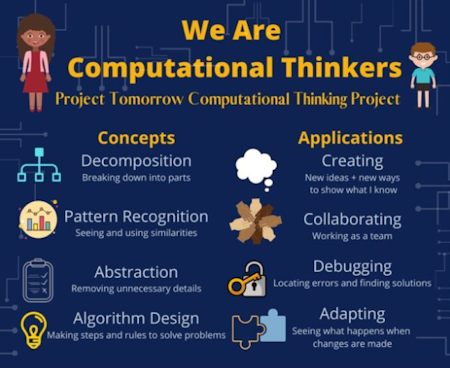
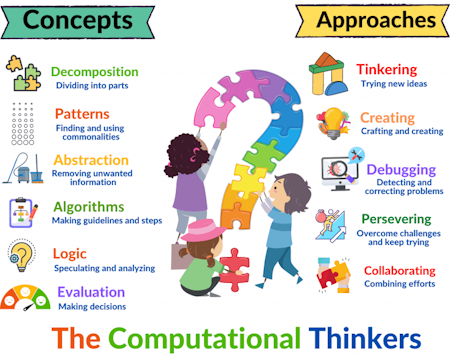
THE FOUR PILLARS OF COMPUTATIONAL THINKING:
Decomposition
- Definition: Breaking down a complex problem or system into smaller, more manageable parts.
- Example: When planning a long trip, decomposing the task into "booking flights," "finding accommodation," and "creating an itinerary".
- Example: To bake a cake, you break the process into "preparing the pan," "mixing the ingredients," and "baking the cake".
Pattern Recognition
- Definition: Identifying similarities, trends, or regularities within or among problems.
- Example: A GPS system recognizes traffic patterns to suggest the fastest route.
- Example: When sorting a large group of items, you look for patterns in their features to help you sort them more efficiently.
- Definition: Focusing on the most important information and ignoring irrelevant details.
- Example: When giving directions to a new place, you focus on the main roads and landmarks, not every single house you pass
- Example: A book summary on the back cover or a review provides the main plot points and themes, abstracting away thousands of individual sentences and words.
- Example: When teaching a computer to play chess, you represent the board and pieces in a way that captures their essential properties while ignoring things like the material they are made of.
- Definition: Developing a step-by-step set of instructions or rules to solve a problem.
- Example: The steps you follow to get ready in the morning, from brushing your teeth to getting dressed.
- Example: Creating a recipe to bake a cake, with precise instructions for each ingredient and step.
https://www.tomorrow.org/projects/computational-thinking-projects/
https://www.learning.com/blog/understanding-computational-thinking/
More examples and classroom applications: https://www.weareteachers.com/computational-thinking/
- Block Coding: This is a visual and active approach to coding that helps students build programs using blocks of code. Octostudio (app) on the iPads or Android Tablets
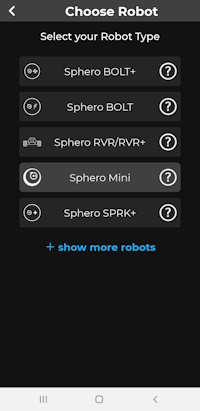
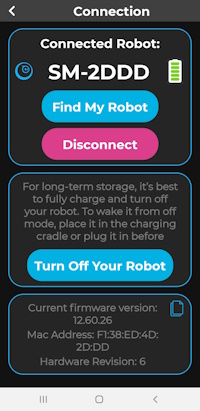
- Spheros and the app on your phone - Three ways to control the spherical robot (Drive, Draw, Code/Program)
- Open Sphero Edu on your tablet
- Today we are just going to get comfortable with "driving" the Spheros and trying out some accessories.
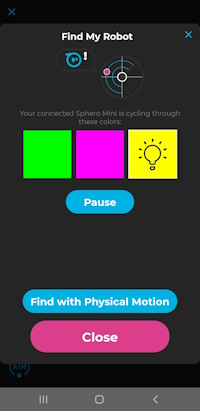
Choose Drive/Touch Control - Find and pair your device with your Sphero. Make sure to choose the correct Sphero and not someone else's
- Calibrate the Sphero by using Aim to aim the light on the Sphero toward you
- Use the remote control on your phone/iPad to move the Sphero and change speed, etc.
- Disconnect from the top right icon.

- "Baby, you can drive my
carSphero!"
YOUR CHOICES:
- GROUP: Finish your Goosechase missions
- WITH OTHERS BUT SOLO: Experiment with driving your Sphero.
- SOLO: Finish your Octostudio coding "story"
RESOURCES O' THE DAY:
A Great Educational Coding Website
https://www.codeforlife.education/
Top Coding Websites for Kids
https://codakid.com/top-21-kids-coding-websites-of-all-time/
10 Free Coding Games Websites for Teaching Programming Skills
https://childhood101.com/coding-for-kids/
Hour of Code
https://hourofcode.com/us
Why teach robotics in schools?
https://blog.robotiq.com/7-reasons-to-teach-robotics-at-school
Computational Thinking Competencies
https://www.iste.org/standards/computational-thinking
Computational Thinking Teacher Resources (RICH RESOURCE)
https://id.iste.org/docs/ct-documents/ct-teacher-resources_2ed-pdf.pdf?sfvrsn=2
A Comprehensive List of Coding Resources
https://mommypoppins.com/coding-kids-free-websites-teach-learn-programming
Videos on Computational Thinking and Coding:
Computational thinking: A digital age skill for everyone
https://www.youtube.com/watch?v=VFcUgSYyRPg&t=1s
Other Videos from ISTE
https://www.youtube.com/user/istevideos/search?query=computational+thinking
A Fabulous and Free Coding Website for Kids from MIT - Scratch
https://scratch.mit.edu/projects/editor/?tutorial=getStarted
Sphero
Overview of Sphero for Teachers from the Company
https://cdn.shopify.com/s/files/1/0306/6419/6141/files/SpheroEdu-k12-teacher-resource-guide.pdf?v=1585146735
Teacher's Guide
https://dmmedia.sphero.com/email-marketing/Sphero-Edu/SpheroEdu-k12-teacher-resource-guide-v1_updated050818.pdf
A list of Sphero Challenges from a classroom teacher in Georgia