
Return to Digital Literacy Web Agenda
February 5, 2026
How Will Schools Respond to the A.I. Revolution? |
- Sign in, stowe your other devices, and log into a Chromebook. Complete the While You Are Waiting (WYAW) activities (including attendance!)
- Questions about the Tech Lesson Plan (Flippity integration)?
- TABLE GROUPS:
- Reflect on the J. Spencer video on AI and Vintage Innovation and read the question
- Talk with your group members about your question (from the video)
- AI Generated Creative Work: One example - Suno
- Suno is a tool that trains it's AI models on the creative work of others. Much of what is found openly on the internet.
This is someone's creative work, however, and they may not be aware that their work is being used in this way.
- What are your thoughts on this? What are the implications for us as teachers?
- As teachers, we can create our own audio as it can be powerful for a variety of instructional purposes. Read Alouds! Podcasts! Listening stations!
- Some ideas for using audio in the classroom either to listen or to record.....
- Use atmospheric music to set the tone for a read aloud or a writing prompts (e.g., scary stories)
- Have audio recording software set up on a station/learning center computer or iPad for students to record themselves telling a story, singing a song, reciting a poem, explaining a concept, process, or information related to the curriculum.
- Create a podcast "Week in Review" to update parents on the week's events or activities to keep them in the loop.
- Use text to speech software to scaffold understanding of written information for students (e.g. built into Google Slides and Docs, Adobe Acrobat Reader)
- You can access readings from NewsELA that read the text aloud and are on a variety of topics. Here's an example: https://newsela.com/read/lib-children-birmingham-march/id/46058/ (2nd grade)
(requires free signup and login to access read aloud)
- There are also text passages that have read-aloud built in such as the tool, ReadWorks:
https://www.readworks.org/article/Becoming-a-Baker/873707fd-db07-409d-95f4-f7d68eaed899 (6th grade) - But wait, there's more!
- Students: Record an approved performance (e.g. singing, skits and plays), Conduct oral histories, Create podcasts
- Teacher tool: Assessment - over time, record children reading to gauge fluency, etc.; Instructional - ELA: kids reading their stories to contribute to digital storytelling, Create a listening center of favoriate stories for your students to read along with, Create podcasts for upper elementary or middle grades students or access existing ones.
Professional development: Artifacts in your professional portfolio such as National Board Certification, Using for action/classroom research, Access podcasts for professional development (http://www.edutopia.org/blog/best-education-podcasts-betty-ray) and personal stress relief (https://www.newyorker.com/podcast/fiction
- Combine with digital images to create digital stories which we will explore in the coming weeks......whoohoo
- Students: Record an approved performance (e.g. singing, skits and plays), Conduct oral histories, Create podcasts
- You can also use Vocaroo (or another recording tool) to create your own Listening Stations for students. https://vocaroo.com/
What's one reason you chose to become a teacher?
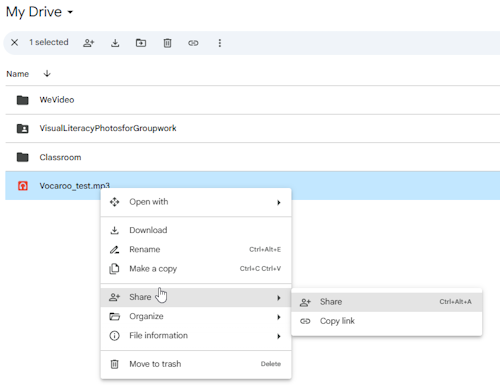
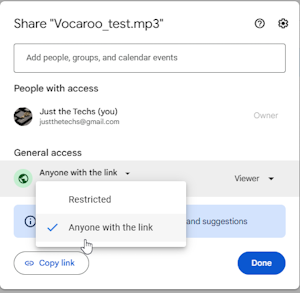
We'll walk through the steps to download the recording >> upload it to Google Drive >> Share with Anyone with the Link >> Paste the link on this shared Google Slide
https://docs.google.com/presentation/d/1XpEz0RRSN0eb5Q6bvjHFTIUstesZLpY8gmQ1HFlbejM/edit?usp=sharing
- Look at these examples of listening centers for students......
- AI Portfolio:
Part A:
|
 Image from Pixabay
- From the options offered, choose an educational strategy/topic for which you will create a podcast
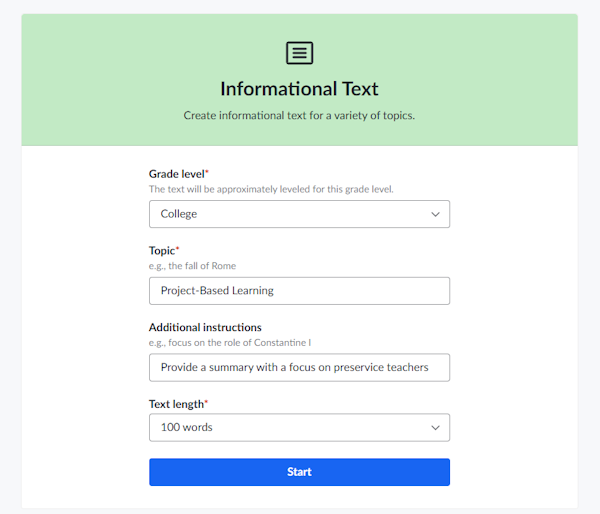
- Open up the informational text tool in KhanMigo (https://www.khanacademy.org/teacher/khanmigo-tools) and create a professional 100 word/1ish minute Podcast on your topic. End your Podcast with an example for the classroom (your idea not AI's) This is the prompt for "Project-Based Learning" Use these same fields EXCEPT replace the topic with the one you chose.
Part B:
- Record it using this tool (not your phones) since this is what your students can use.
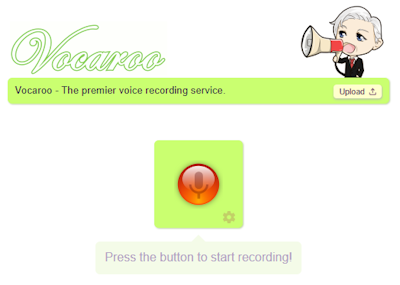
- Record your script of your teaching strategy adding your own example at the end with Vocaroo https://vocaroo.com/
- Download the audio file,
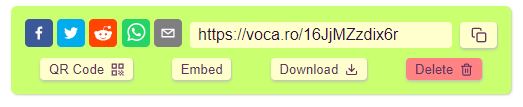
- Copy it to your Google Drive
- Find the file in Drive and right click on it to SHARE the link so anyone with the link can access.
Here are some additional tools to try or at least to be aware of as some are being used in NC classrooms:
- DeepFake https://deepfake.civai.org/ (We'll do this together but first, who sponsors this?)
- Story AI: https://storyai.cc/ (you don't need to pay, take a screenshot of the brainstormed idea -yellow box)
- Quiz Gecko: https://quizgecko.com/
- Pictory https://app.pictory.ai/home
- Adobe Firefly (images and more) https://firefly.adobe.com/
RESOURCES:
A very comprehensive, thought-provoking, and informative presentation on AI from Vera Cubero at NCDPI https://www.canva.com/design/DAGFm6FMxsM/TcJdbQrf4qJ5vJXk2EVKpw/edit
A spreadsheet of resources from NCDPI on AI including Webinars and Presentations
https://www.dpi.nc.gov/districts-schools/districts-schools-support/digital-teaching-and-learning/ai-resources